Which website images to optimize?
One of the main reasons we need tools like The Image Optimizer is that most images we use every single day are extremely bloated. Some of them aren't immediately obvious so we made this list of the most commonly unoptimised images for your reference.
Pictures from your phone and/or camera
Device makers have been racing to the highest number of megapixels in their cameras for quite some time. This doesn't always come with an increase in quality, though. Most pictures taken with a modern flagship smartphone are at least 4,000 pixels wide. For those who boast 50MP cameras or larger, that number is at least more than double that. That's 2.5-5x more than our recommended target for the typical largest resolution of a website image.
Stock photos
Stock photos are marketed as a plug-and-play solution. Meanwhile, even paid stock photo platforms give you very little flexibility in terms of the resolution of your image. But let's face it, even if they did give you full control, you'd usually press the default download button anyway.
The resolution of that image? Once again, several times higher than recommended for even the largest website image. And even if your platform of choice offers multiple resolution choices, they will rarely be exactly what you need. Here's an example:
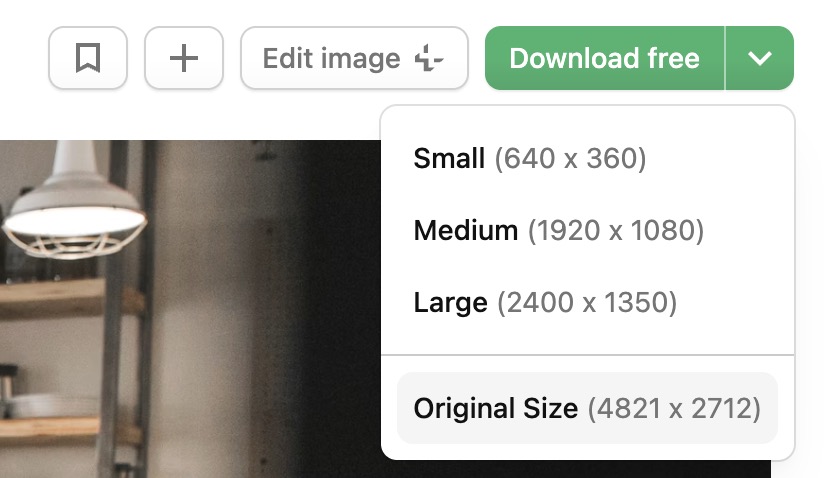
Even though you have four options, these would rarely fit your exact needs. “Original Size” is the default resolution for the “Download Free” button — three times larger than we usually recommend. “Medium” is the closest, but still usually too large, while “Small” is virtually unusable in most cases.
On top of that, these images are always uncompressed. This is helpful because they give you full control over what happens with the stock photo after you download it... but once again, most of the time you just want to upload it to your website right away without a second thought.
Company logos
While not the most surprising entry on the list, company logo images are often one of the most annoying file types to optimize. Not all businesses supply their partners with usable images. The list of offences here is vast, ranging from tiny files of poor quality, through large files made for print rather than web, all the way to not having SVG as an option.
Vector images (SVG) are the best option for logos 9 times out of 10. That's because they're extremely light and can scale infinitely without increasing the file size. It doesn't matter if your partner logo is 40x40px or 250x250px — it will be just a few (kilo)bytes regardless of the resolution.
PNG isn't all bad, though. Complex logos saved as SVG or poorly optimized vector images can be larger. As a rule of thumb, we recommend defaulting to SVG, but always double-check.
Screenshots, especially the MacOS default
The most unexpected entry on the list are screenshots. Your mileage may vary depending on the tools and the operating system you're using, but let's take MacOS default screenshot settings as an example to illustrate the point.
The default screenshot on a Mac is saved in PNG. On the surface, there's nothing wrong with that. PNG offers high quality, with lossless compression. At the same time, it contains a fair bit of unnecessary data bloating the file size. A typical PNG screenshot on a Mac is over 40% heavier.
How to optimize these bloated images?
We've described this in our article on how to optimize images for websites, which also explains how to make the best use of Tio, the simple 2-in-1 image optimizer.